NG Bailey
Useful information
- The cost code is found by the Purchase order number (customer calls this 'Job Number'), for example J1/25707. If cost code is not set up, you need to AdHoc.
- Billing needs to match invoice address.
- The invoice email will indicate the account to use;
- fin.eng-invoices@ngbailey.co.uk - Engineering
- ngbsub-contract@ngbailey.co.uk - Engineering Sub-Contract
- fin.fs-invoices@ngbailey.co.uk - Facilities Services
- ngbfssub-contract@ngbailey.co.uk - Facilities Services Sub-Contract
- agencylabour@ngbailey.co.uk - Agency Labour
- fin.its-services@ngbailey.co.uk - IT Services
- ngbitssub-contract@ngbailey.co.uk - IT Services Sub-Contract
- fin.group-invoices@ngbailey.co.uk - Group
- fin.osm-invoices@ngbailey.co.uk - Offsite
Account Details –
- Account manager – Adam Massey - adam.massey@lyreco.com
- EDI - No
- Credit Controller – Emma Maddox
- Main Customer Contact – Lewis.Dunn@ngbailey.co.uk
Ordering Requirements –
- Price match – No price match
- Alternatives – Order if near identical and can price match - If not advise the customer of the alternative and SAP price
- Locate By – Postcode and Contract Number, eg CX / 30623, If IT account there will be a project code that begins with a 2.
- SAP order type – C
- Zendesk Orders – Yes
- Phone Orders – No
- Webshop Orders – Yes
- PO Flip – No
- Sites – No
- OCR – No
- Specials – Yes
- Webshop Logins – No
- Product Allowed list? – Yes
- CSP's – No
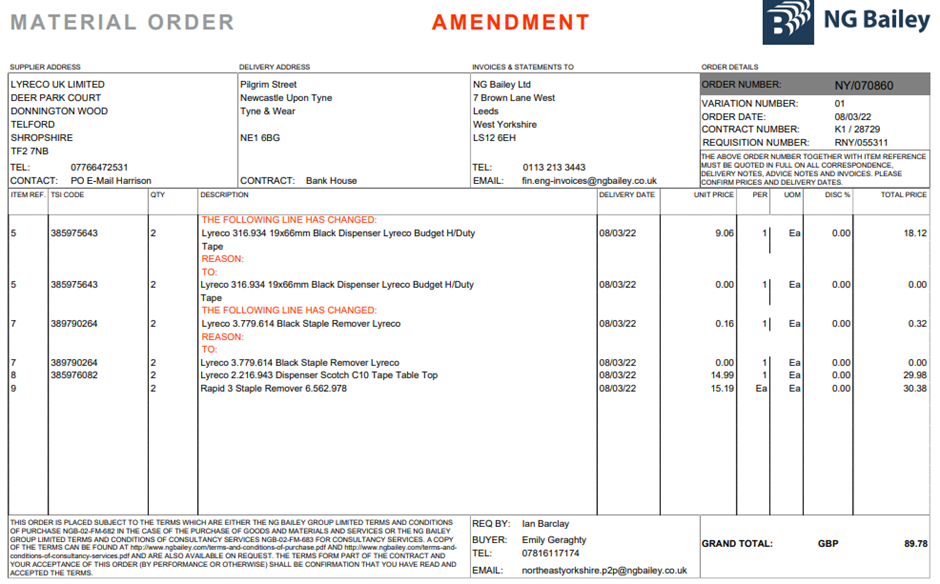
Example of an order
Comments
0 comments
Article is closed for comments.